There is no single answer to how long it takes to edit a video into shorts, because the honest range spans roughly fifteen minutes to several hours per clip. What decides where you land is not your editor — it is how much of the repetitive work you batch and automate. Here is how to get a real number for your setup, and where the hours actually leak.
How long editing a video into shorts really takes
The honest answer is a range, because three variables drive almost all the variance. First, the source itself: a two-hour podcast with clean segments is not the same job as a one-hour gameplay stream where you have to hunt for the moments. Second, what you call "done" — a raw cut with no captions is fast, while a captioned, reframed, resized short with timed subtitles is not. Third, your batching: someone producing shorts one at a time spends far more per clip than someone who reuses the same caption style and export settings across a batch.
Solo creators who edit multi-hour streams themselves consistently report the same thing: the biggest cost is not the cutting, it is everything that comes after the cut. Once a short needs captions timed to the audio and a vertical reframe, the editor is no longer the bottleneck — the repetition is. That is why the same person who can cut ten clips in an evening still runs out of time before a single short is publishable.
One cost rarely counted in that estimate: the time the file spends travelling. A two-hour recording is a few gigabytes, and getting it to whoever cuts it can add an hour of upload before a single frame is cut — sending a large video file is its own problem.
Why "just cut the best moments" costs you hours
The most common advice — open your editor, pick the highlights, export — breaks apart the moment you need volume. Each short means choosing clips, setting cut points, adding captions, reframing to vertical, checking the timing, and exporting. None of that transfers to the next short.
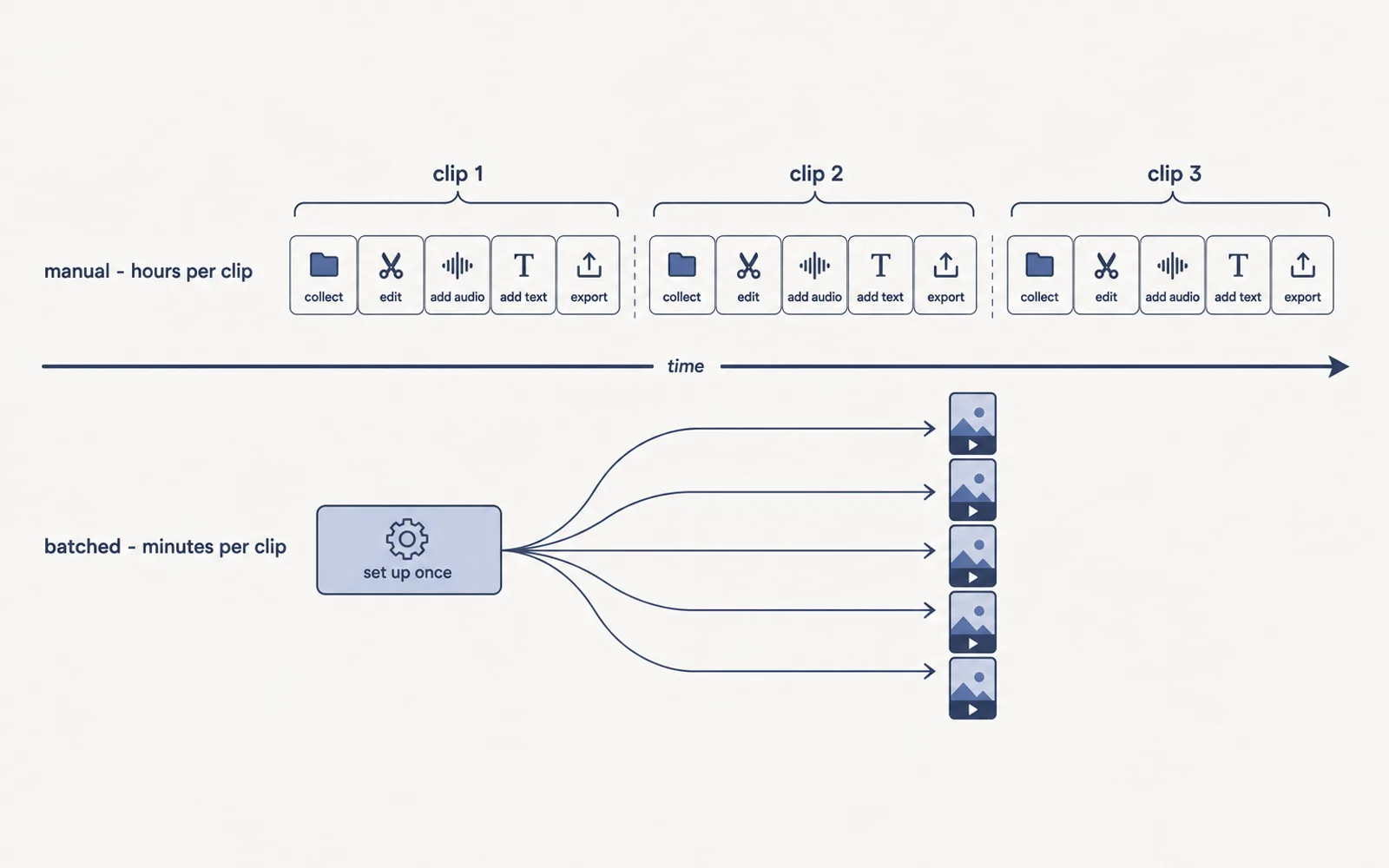
The real trap is treating every clip as a fresh project instead of a line you run repeatedly. Every short re-does the same setup, and the hours stack up invisibly across a batch.
A clip workflow that takes minutes per short
The principle is that most steps are identical for every clip, so you do them once as a template and each new short becomes a review, not a rebuild. This is the shift that separates a creator who treats every upload as a fresh project from one who runs a repeatable line.
- Pick your moments from the long video — the hook in the first three seconds, then the highest-retention beats.
- Set the cut, then reuse the same export settings, resolution and format for every clip.
- Generate the captions once from the transcript and apply one consistent style to the whole batch.
- Reframe to vertical (9:16) with a single auto-framing pass instead of hand-moving a crop window.
- Review each short for timing, then export the batch.
The first short in a session pays for the setup; every one after it is nearly free. That is where clips-per-hour multiplies. The last step is the export, and it is where sharpness is won or lost: the settings that keep a finished short clean after upload.
The repetitive 80%: captions, reframing, resizing
Cut the long video into clips and you are about twenty percent through the work. The other eighty percent is the tedious part every editor names first: captions timed to the audio, a 16:9 frame reframed to 9:16 without losing the subject, and a resize to each platform's requirements. On a thirty-second short with several caption changes, hand-timing is where the hours go — see how to caption shorts so viewers stay longer.
The fix is not a better editor; it is generating the captions, crop and style once and applying them across the batch. That repetitive part is exactly what ClipFinish's clip production line automates when it turns a long video into a batch of captioned, reframed shorts. To be honest about the limits: it will not invent your creative cuts, and it is not a substitute for a human deciding which moments matter. The machine takes the repetitive eighty percent; you keep the judgment.
Going from one short to ten a day
Creators posting three to forty shorts a day are not editing faster inside the same editor — they built a pipeline. The difference between one short and ten a day is rarely the source material; it is whether the workflow scales. YouTube's own format rules push the constraint there: shorts run up to three minutes in a square or vertical format, so the technical bottleneck is captions and reframing, not length (three-minute Shorts, getting started with Shorts). Once your batch workflow is set, adding a short is a new selection of moments, not a new setup — the marginal cost of clip number ten is close to the marginal cost of clip number two, which is precisely what makes ten a day realistic. If the number you are actually after is the daily one, our breakdown of how many Shorts a day you can realistically post answers it directly. The two halves of that cadence have their own guides: where the hours actually go in why editing Shorts takes so long, and the mechanics of running one batch in how to make multiple Shorts from one video. The mechanics that keep that pace up are covered by how to batch edit clips, and the single-speaker case has its own guide in turning a solo talking-head video into shorts.
Quick answers: how long does it take to edit a video into shorts
- How long does it take to edit a two-hour video into shorts?
- Cutting the clips is the smaller part; captions and reframing are where the hours go. A batch workflow with one caption style and one reframe pass drops each additional short to a few minutes of review.
- How many shorts can you make from one long video?
- As many clean moments as it contains — a structured hour usually yields several. The ceiling is your time, not the source.
- Is auto-reframing reliable enough for vertical shorts?
- For dialogue and single-subject footage, a good auto-reframe pass is usable on most clips and you review the rest. Hand-moving a crop box on every frame is exactly the work a pipeline removes.
Editing one long video into shorts gets fast only when you stop redoing the same work on every clip. Set the cuts, captions and reframing once as a repeatable workflow, and each additional short drops from hours to minutes. That is the entire job of a clip production line — which is exactly what ClipFinish automates when it turns a long video into a batch of captioned, reframed shorts.