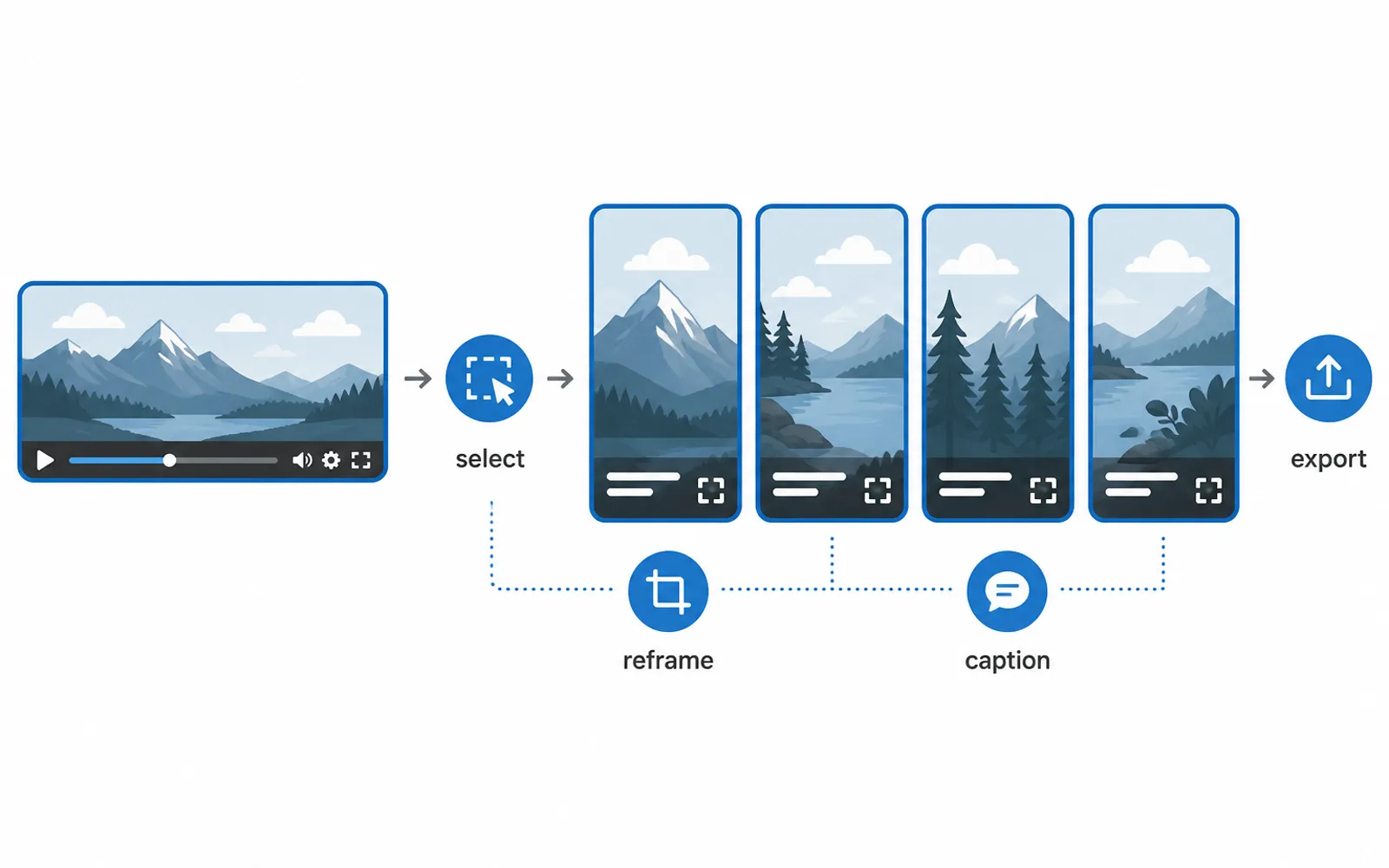
When people say editing Shorts takes too long, they are almost never talking about the cut. The cut is minutes. The hours go into the work around it: reframing a clip to vertical, laying captions, checking, exporting — then doing all of it again for the next clip. This is the production pass, and it is where editing time actually disappears. Here is where that time goes and how to get it back without touching the creative part.
It's not the cutting that's slow — it's the pass
Ask anyone who makes Shorts at volume where the time goes and you get the same answer the tools ignore: the cutting is not the problem. One creator who tracked the hours put it plainly — the drain is 'the stuff around it. Captions, resizing for shorts, re-exporting.' A clip is a few seconds to cut and a long time to finish.
The reason the pass dominates is simple arithmetic. You cut a clip once. You reframe it, caption it, check it and export it once per clip too — but that's four or five separate tasks per clip, each one just tedious enough that you can't ignore it, and none of it feels like progress.
Where the time actually goes: four tasks that repeat
The pass isn't one thing, it's four, and each one is a per-clip job:
- Moment selection — deciding which parts of a long video are worth a clip in the first place. This is often the single biggest cost, because it means reviewing the source, not just cutting a clip.
- Reframing to vertical — turning 16:9 footage into a 9:16 frame without losing the subject. The crop is automatic; keeping a moving speaker in frame is not. Adobe's own Auto Reframe motion presets are a good reference for how the tracking is meant to behave before you start fixing it by hand.
- Captions — timing words to audio and picking a style. This is the task that turns a scrollable clip into one people watch, and it is pure repetition across a batch. Short-form is overwhelmingly watched with the sound off, which is exactly why the words carry so much of the clip — Wistia's State of Video data is a useful reference for how much of the experience the visual carries.
- Export and QA — rendering, checking, naming, and preparing each file for posting. Low skill, high count.
What matters is that these four repeat for every single clip you produce. A podcast episode that becomes a dozen Shorts means a dozen reframing jobs, a dozen caption passes, a dozen exports. The selection is a judgement call you want to keep; the other three are identical every time.
Why the obvious fixes don't work at volume
The obvious answer is 'just get faster at the pass.' It's the wrong answer, because the pass doesn't fail from lack of speed — it fails from repetition. No amount of keyboard shortcuts removes the fact that you perform the same four tasks for the tenth clip that you performed for the first.
A second common fix — using a simpler tool — just moves the problem. CapCut is fine for a single short edit, but when a campaign or an episode needs ten or twenty finished clips, a tool built around one-at-a-time editing makes you repeat the setup for every clip: the same canvas, the same captions, the same export settings, again and again.
The tools that do offer batch still leave you doing the creative half by hand, and that's the point: the goal isn't to make the pass slightly faster, it's to stop repeating it.
Cut the pass: set it once, apply it to every clip
The way to remove the pass isn't to do it faster — it's to do it once. That's the shift from editing clips to running a production line:
- Pick the moments — this stays human. Read the transcript, mark the candidates, keep a shortlist. It's the only per-clip decision that is actually yours.
- Set the frame and the caption style once — the vertical crop rule and the caption look that every clip in the batch will share.
- Apply to the whole batch — every shortlist entry gets the same frame, the same captions, the same export format, so consistency is guaranteed instead of hoped for.
- Review the finished batch — check the handful of clips that matter and adjust if needed, instead of rebuilding each one.
This is what ClipFinish does: you choose the moments, set one framing and one caption style, and it returns a batch of finished vertical Shorts — the same output as the manual pass, without repeating the pass per clip. The batch mindset is the same one our guide to making multiple Shorts from one video walks through in detail.
What to automate and what to keep human
The cleanest rule for where to draw the line is this: automate what is identical for every clip, and keep your judgement for what is different every time.
Identical for every clip: the frame, the caption timing and style, the export format, the consistency across the batch. A machine is better at these than you are, and it does them without getting tired or cutting corners on the tenth clip.
Different every time: which moments become clips, what the hook is, what the Short is actually about. That's the creative core, and handing it to an algorithm is how you end up with clips that look right and say nothing — our guide on which moments to clip for Shorts explains why automated moment-picking usually fails.
The honest limit: ClipFinish handles the production pass — framing, captions, batch export — but it doesn't write your hook or choose your moments. That's deliberate. It means the time you get back is time you spent on nothing creative, and the time you keep is the part only you can do.
- What exactly is the production pass when editing Shorts?
- It's the set of per-clip tasks that surround the cut itself: reframing to vertical, adding captions, checking and exporting. It repeats for every clip, which is why it dominates editing time at volume.
- Is reframing or captioning the bigger time cost?
- Both repeat per clip, so whichever feels slow is the one you do most often. For a long source with many clips, the combined pass is usually a larger share of the work than the cutting.
- Can I just get faster at editing Shorts instead of automating?
- Faster helps on one clip. It does nothing for the tenth, because you're repeating the same four tasks. Removing the repetition is what actually scales.
- What should I keep doing by hand?
- Choosing the moments, writing the hook, and deciding what each clip is about. That's the creative core, and it's the part a production line can't — and shouldn't — do for you.
The lesson is that editing Shorts is not one big task, it is one small creative decision repeated inside a long mechanical pass. The cut is the part that is yours; the reframing, the captions and the export are the same for every clip, and that repetition is exactly what a machine is better at than you are. Leave the moments and the hook to yourself, and hand the pass to ClipFinish — drop a long video, pick your moments, and get a batch of framed, captioned vertical Shorts back without the per-clip grind.