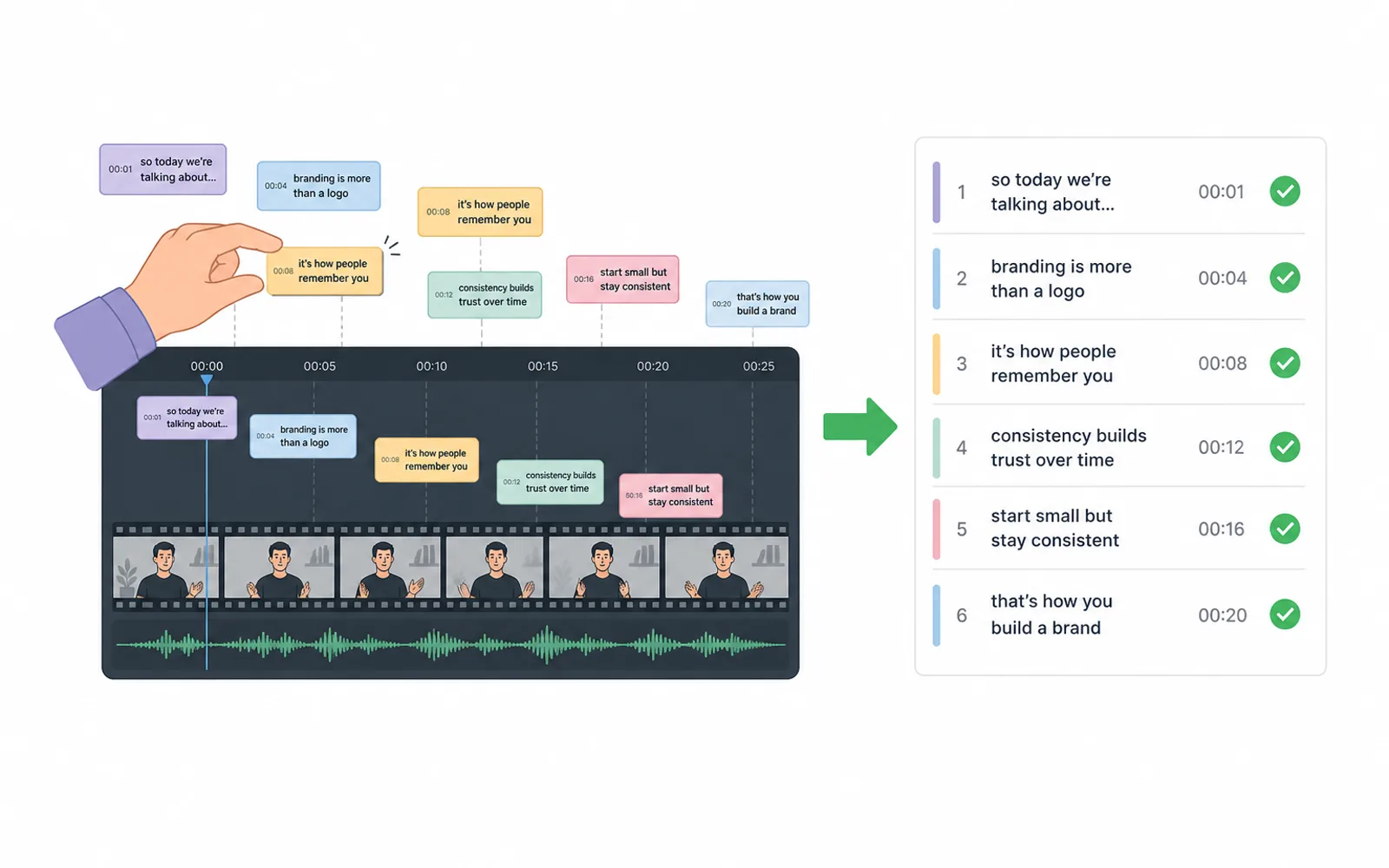
Word-by-word captions only work when every word lands at the moment it is spoken — and that timing is the part that fights you. On a video timeline each word and line sits as a little box you scrub, nudge and re-check, so a two-frame drift or a trim upstream reopens the whole sequence. This article explains what a caption actually is and why the reliable way to edit one is not a timeline at all: a subtitle is a list of cues — synchronized chunks of text that you read, correct and validate — and treating it that way is what lets a batch of shorts finish on time.
A caption is timed text, not a layer of graphics
When you caption a short you are adding a second reader: a lot of people watch with the sound off, so the text is not decoration, it is half the story. And a caption is not one thing — it is text carrying three constraints at once, and every one of them is about time rather than drawing.
Word-by-word. The natural unit of a caption is the word. On TikTok, Reels and Shorts the standard effect is that the spoken word is the word on screen, or the word that lights up as it is said. That means every word needs a start and an end of its own, counted in frames — not a whole line blinking on and off.
Timing. Each cue has to open the moment its words are spoken and close once there has been time to read them. Editors who time by hand start a caption on the frame the audio starts and leave it on for a beat after the line ends, because a line is sometimes said faster than it can be read — a working rule from Derek Lieu's caption and subtitle guide, who also keeps a few frames of empty space between consecutive captions so the eye can see the text refresh.
Découpage (splitting). You also decide where a sentence breaks into readable cues — a line or two at most, split cleanly on a pause or a comma when it runs long. A split that is wrong for the reading speed is wrong even when every timestamp is perfect.
So a subtitle is a small database: words, each with its own window, grouped into readable cues. That is the thing you are really trying to keep correct — and it is why the usual editing tool has the wrong shape.
Why fixing captions on a timeline is so fragile
An editing tool stores a caption as a text clip (or a graphic) lying on a track above the video. To correct one word you do not read it — you find its box among dozens, scrub to it, grab an edge and drag until it lines up with the waveform. Move one and its neighbour may now collide with it; some platforms keep a minimum gap between cues, so the fix you just made pushes the next one. And because the caption is glued to the cut, a trim upstream — dropping half a second of dead air — silently shoves every following caption out of sync, and you only notice by replaying the short.
That is what makes the correction loop cost more than it should. The words are usually almost right already; what burns the time is the hunting, the nudging and the re-watching. In one observed podcast-to-clips workflow, an editor was spending about twenty minutes of every hour just re-fixing auto-caption timing and edge cases — not writing captions, but keeping them aligned. Scale that across a batch of shorts and it is the fragile part, not the creative part, that eats the afternoon. The editors who feel it most are the ones doing short-form at volume — the same operators who keep asking for "well-timed" and "word-level" captions when they hire.
Keyframes and auto-caption AI remove typing, not the fragility
The obvious fixes speed up the typing but leave the fragile part exactly where it was.
Presets and keyframes give you the word-by-word look, but a template still has to be told when each word starts and ends. Where captions cannot do that natively, the workaround is a motion-graphics template — and templates still ask you to lay one word after another out on the timeline, which is the manual, per-word timing that made it slow to begin with.
Auto-captioning produces a transcript that is mostly right and generates the timing, so you are not typing from scratch. But the output still lands as clips on a timeline, and the transcript is never perfect — names, jargon and homophones come back wrong, and the timing drifts off the real speech. The part you correct by hand is the part that still lives in the same fragile editor.
The common thread is that every fix sends the text back into a tool built for moving pictures. That tool answers "does this shot cut well?", not "is word 42 in sync?". Automation has removed the typing without changing the shape of the work — which is why even very good auto-captions still feel like a chore.
The file format already says it: captions are cues
Set the video editors aside and look at what a caption actually is once it leaves them. An .srt or .vtt file is not a sequence of graphics and it is not a timeline. It is a flat list of lines, and every line is one cue: a start time, an end time and the text that appears between them. The W3C specification for WebVTT states it plainly — the format is a sequence of text segments associated with a time-interval, called a cue. Captions, translated subtitles, even chapters: it is all the same thing, chunks of text aligned to time.
That list is what makes the format robust where a timeline is not. Change the words or the window of one cue and nothing else in the file moves unless you ask it to; re-order two lines and you have re-ordered two cues. A whole short is a document you can read top to bottom and check: is this word right, does it open where it is said, is the split readable? A .vtt opens in a text editor and validates line by line. That is not a quirk of an old format — it is the correct model for what subtitles are, and it has been the model for decades.
What editing captions as a list of cues feels like
Once captions are cues, the workflow changes from scrubbing to reading. You work on the list, not the frame. In order, you check three things: accuracy — is the word the word that was said? sync — does its window sit on the moment it is spoken, not half a second later? chunking — is the cue readable, a line or two, split where a human would pause? Because timing is data, a word that is two frames off is a number you fix in place and the cue after it does not slide. Because the list is the artifact, correcting the transcript once fixes every export that uses it — re-cut the video and the words you already validated stay validated.
This is the model ClipFinish's word-by-word captions are built on. ClipFinish manages your captions as a list of cues with per-word timing: you read the transcript, correct a wrong word or nudge a window, validate the list, and the whole short inherits it — no dragging boxes on a timeline. The honest limit is that ClipFinish is not a motion-graphics editor: if you want bespoke, hand-built kinetic typography with its own choreography per word, a full editing suite remains the right tool. What ClipFinish removes is the part that is never creative and always fragile — keeping plain word-level captions in sync.
One validated list, a whole batch of shorts
Short-form work is batch work, and that is where treating captions as a list pays twice. Lock the transcript and its timing once, and every clip cut from the source inherits the same validated cues; when a platform needs its own safe zone or a re-export at a new ratio, you re-frame the frames and the captions reflow as cues — the text is not re-synced from scratch. Combined with where to place captions on shorts and framing text clear of each platform's interface, a captioned short is set once and reproduced for the whole lot. Rework in short-form is almost never the cuts; it is the finishing pass — ratio, captions, safe zone, export — delivered blind, as the article on stop redoing your shorts argues. A validated caption list is exactly a finishing pass you only do once.
A subtitle is not a sticker you drop onto a finished picture — it is the picture's second track of meaning, and the reliable way to build it is as synchronized, validated cues of text, not as graphics you drag along a timeline. Words with windows, grouped into readable lines, checked top to bottom: that list is the real deliverable, and a whole batch is only as good as the list being validated once. That is exactly the model ClipFinish's captions are built on — word-by-word timing managed as a list of cues, so you read, correct and validate instead of scrubbing. Try it on your next batch of shorts.