Turning a Twitch VOD into Shorts does not have to mean hours on a timeline. You read the transcript, pick the moments worth keeping, and let the machine finish the whole batch at once. This article gives you the exact workflow, and the one mistake that turns a good clip into a dead one.
Why a stream is the hardest long-form to clip
A podcast has a shape: a topic, a guest, a take. A stream has pauses, tangents, in-jokes, dead air — and sometimes the best moment is buried at minute 142 of a four-hour VOD. The gap is structural, not a lack of effort. You cannot skim three hours of video the way you skim a page of text. So most streamers either post the raw VOD and hope, or watch the whole thing twice: once to find moments, once to cut them. Both are a second full-time job next to the actual streaming.
The result is that hours of good content sit in a VOD folder no one ever sees. Twitch's own highlights feature helps by cutting the long-form down into manageable chunks — but each chunk is still footage you have to re-watch to find anything. The fix is not a faster timeline. It is not watching the timeline at all.
The transcript method: find moments without scrubbing
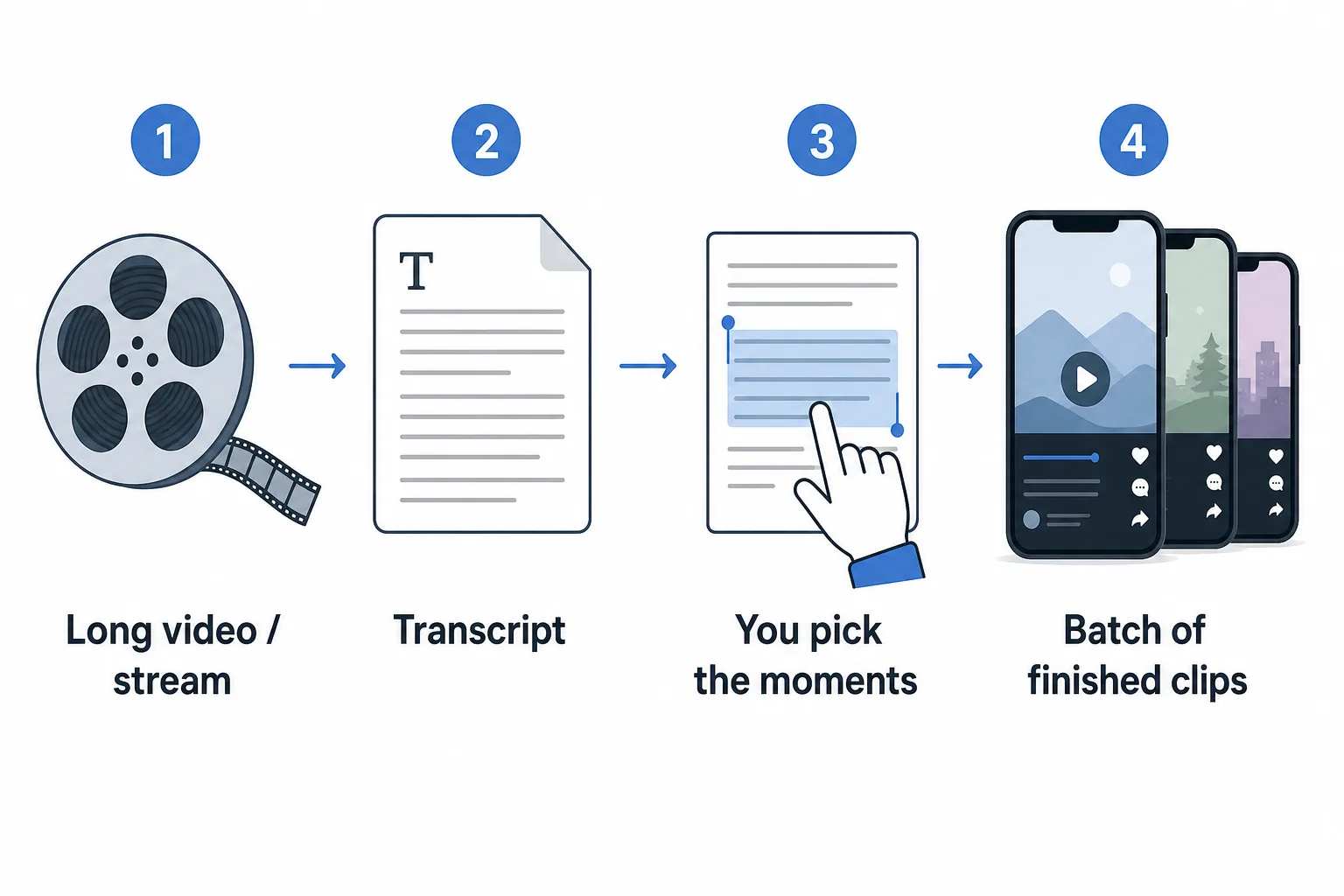
The shortcut is to stop working with footage and start working with text. Transcribe the VOD, then read it. Words are skimmable; video is not. You scan a page in seconds and see where the energy is, where a story starts, where the punchline lands. When a passage looks alive, you listen to that thirty-second stretch to confirm the tone, then you move on. You are not watching the stream to find clips. You are checking the ones the transcript already surfaced.
Working from a transcript is not a special skill. It is the difference between reading a book to find the best pages and watching a film on fast-forward. The same hour of source takes minutes to scan, not an hour to watch.
- Transcribe the VOD — ClipFinish does this for you when you drop the file.
- Skim the transcript and mark the passages that read like a clip.
- Play each marked stretch back to confirm the tone matches the text.
- Keep only the moments that stand alone: a full thought, with a start and a payoff.
What actually makes a clip from a stream work
A clip is a unit that has to survive on its own, in a feed, next to everything else. It needs a hook in the first two seconds, a single point, and a payoff before it ends. The most common failure is picking a moment that only lands because of the thirty seconds of setup before it. You loved it in context; a stranger scrolling did not get that context. The opposite failure is just as common: picking a moment that is not finished — a sentence that starts mid-thought, a story that stops before the punchline. Test every candidate the way a viewer will meet it: cold. For one quick isolated moment, Twitch Clips grabs a raw 30-second cut in-browser — but it gives you no captions, no vertical framing, and no batch.
This is also where stream clipping falls apart by hand. You found ten moments, which means ten cuts, ten caption passes, ten reframes, ten exports. That repetitive work is the part a machine should do, and it is exactly the part that eats your afternoon.
Batch production: one look for the whole batch
Once the moments are picked, everything left is repetition. The same framing decision, the same caption style, the same hook placement, repeated for each clip. Doing that ten times by hand is where the hours go — not because it is hard, but because it is identical. A batch workflow sets the look once and applies it to every clip in the run, so a single decision produces ten finished videos instead of ten identical decisions. That is the difference between editing ten clips and producing ten clips.
For this part, a tool like ClipFinish's clip production line is built around it: you drop the VOD, pick the moments in the transcript, set the framing and captions once, and get the finished vertical clips back. It is the same batch method for multiple Shorts from one video, applied to a stream.
Captions that survive the platform's UI
Word-by-word captions are not decoration on a stream clip; they are often the only thing that holds a viewer watching on mute. But where the text lands matters as much as what it says. TikTok and Instagram draw their own interface — the account name, the buttons, the counters — over the bottom and right of the frame. Captions dropped "at the bottom" end up underneath that UI, unreadable where people actually watch. A good workflow reserves those zones up front and animates captions word by word, so each one appears as it is spoken.
If you are new to the caption side of this, our guide to captions on Shorts walks through the timing and the placement in detail.
What ClipFinish does — and what it doesn't
Being precise here is the point, because every tool in this space claims more than it delivers. ClipFinish takes a source video up to two hours — a podcast episode, a stream segment, a long interview — and turns it into a transcript. You pick the moments. It does not pick them for you: no AI of ours is going to beat you at knowing what your audience finds interesting. That is deliberately the product.
What the machine does is the finishing you should not have to repeat: vertical framing, word-by-word captions, the hook, and the export, applied consistently to the whole batch. It does not post for you and it does not schedule, because auto-posting belongs to the accounts and habits you already have. And if your stream runs longer than two hours, you work in segments — the same method, the richest hour at a time. Each clip comes out in the 9:16 format the platforms expect, per YouTube's own Shorts requirements. You can try ClipFinish's clip production line free — five finished minutes a month, no card and no watermark.
- How many Shorts can you make from one stream?
- As many self-contained moments as the VOD actually has. A tight two-hour stream can yield ten or more; a slower one, maybe three or four. Quality beats volume — one clip that holds is worth ten that die in the feed.
- Can ClipFinish clip a VOD automatically?
- No, and that is deliberate. ClipFinish turns your source into a transcript and you pick the moments worth keeping. It automates the production, not the judgment — the one part you should keep.
- What if my stream is longer than two hours?
- Work in segments. ClipFinish accepts up to two hours of source, so for a marathon stream you feed it the richest hour at a time. The method is identical each pass.
- Where do the captions end up?
- ClipFinish reserves the zones where TikTok and Instagram draw their interface, so captions stay readable on a phone and follow the words one at a time as they are spoken.
The cost of stream clipping is not the picking. It is the re-doing — the same framing, the same captions, the same export, clip after clip. Cut that out and a four-hour VOD stops being a backlog and becomes a pipeline: you skim the transcript, you take the moments, and the batch comes out finished. Start with one hour, not one stream. If you want to see the workflow on your own footage, ClipFinish gives you five free minutes of finished clips a month, no card, no watermark — enough to test the method before you commit to it.